
AI Redesign - Home Design
Tasmanic EditionsHouse & Home
3.721.00 Reviews
- Version
- 2.0.4
- Installs
- 100.00K
- Age Rating
- Everyone
Screenshots
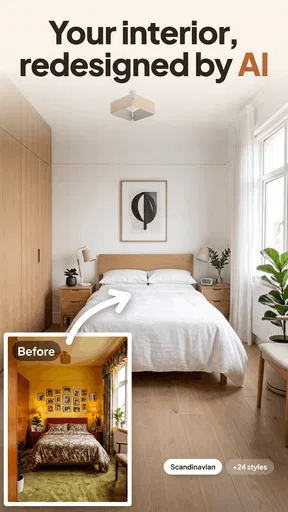
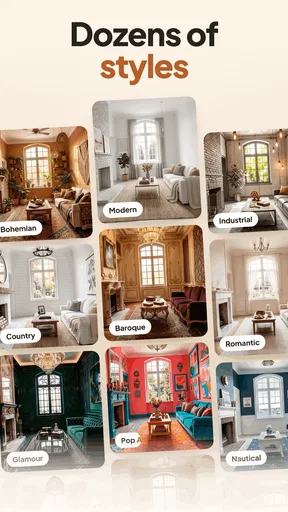
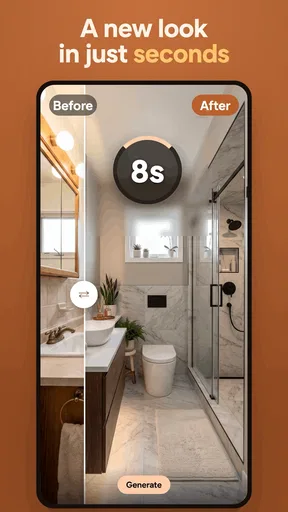
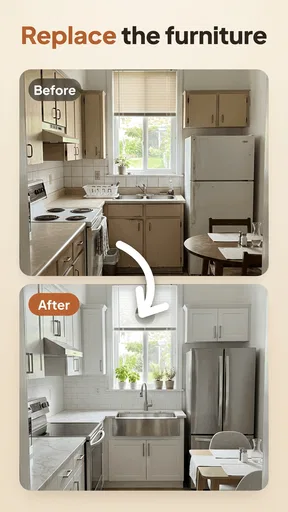
Our Review of AI Redesign - Home Design
 Analysis by Appyee
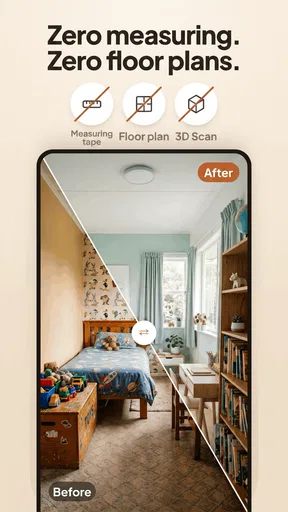
Redesigning a room is exciting until the practical questions begin: will a darker wall make the space feel smaller, does a new sofa fit the existing layout, and will a modern style actually suit the light in the room? AI Redesign - Home Design approaches those questions from a visual angle. Instead of starting with a blank floor plan or a long list of furniture measurements, I can use the app to explore an altered version of a room and judge the mood before making a real change.
That makes it an interesting home design and interior makeover app for people who think visually. My impression is that its value is less about replacing an architect, decorator, or detailed planning tool and more about helping ordinary homeowners move from “I wonder what this would look like” to a clearer direction. The AI element is especially useful at the early inspiration stage, although it also creates some limitations that are easy to overlook when the result looks attractive at first glance.
How the AI redesign experience feels in everyday use
AI Redesign - Home Design is a free app from Tasmanic Editions, aimed at home decoration, renovation ideas, and room makeovers. It is listed for Everyone, which fits the straightforward nature of the concept. The store summary presents it as a way to use AI for home design, interior design, house renovation, and makeover ideas, while the short description reduces that idea to “AI Redesign.” In practice, I see it as a visual experiment rather than a complete renovation management system.
The first useful scenario is a small but familiar one. Imagine that I am considering repainting a living room, replacing a dated cabinet, or changing the general style before inviting a decorator to quote for the work. A conventional search through image boards can provide inspiration, but those images usually show someone else’s room. An AI redesign tool has the potential to make the question more personal: how might a similar direction translate to my own space?
That distinction matters. Inspiration galleries are excellent for collecting ideas, but they can also encourage unrealistic comparisons because the rooms are professionally photographed, carefully staged, and often much larger than the one at home. A redesign based on my own room gives me a more relevant starting point, even when the generated result should be treated as an approximation rather than a construction plan.
I would use the app before buying paint, furniture, or decorative pieces, not after. The best workflow is to photograph the room in good light, keep the image reasonably tidy, and decide what I want to investigate before generating variations. “Make it modern” is a broad request in any design context. A more focused goal, such as testing a warmer contemporary feel or exploring a cleaner minimalist direction, makes the visual result easier to judge.
What the app is good at before a real purchase
The strongest use is narrowing a large number of possibilities. Home design decisions often become tiring because every choice affects another: wall color changes the apparent tone of flooring, furniture style changes how much decoration feels appropriate, and a new focal point can make existing items look out of place. Seeing a proposed direction in the context of the room can help me reject unsuitable ideas quickly.
There is also a useful emotional benefit. Renovation decisions can feel risky when they involve permanent changes. A visual preview does not guarantee the final result, but it lowers the psychological barrier to considering something different. I may discover that I like a softer palette, a more open-looking arrangement, or a style I would not have searched for by name.
That does not mean every generated image deserves equal trust. AI can make a room look more coherent than it would be in reality. It may smooth over awkward proportions, simplify clutter, or present furniture with a visual scale that is not practical. I therefore treat the output as a conversation starter: it helps me describe what I like and what I dislike, rather than telling me exactly what to order.
Why a phone-based approach changes the design process
The mobile format is convenient because home decisions happen while I am already moving around the house. I can think about a room while standing in it, take a photo, and use that image as the basis for an idea instead of waiting until I am at a desktop computer. This makes the app more suitable for quick comparisons during an ordinary day than for a long, carefully documented design project.
There is a trade-off, though. A phone screen is useful for judging atmosphere, color relationships, and broad style, but less suitable for checking fine details. A generated image that looks convincing on a small display may reveal strange edges, inconsistent objects, or incorrect spatial relationships when viewed more closely. I would avoid making a costly decision from a single preview and would compare several versions on a larger screen or alongside real product dimensions when possible.
A particularly practical habit is to photograph the room from the same position each time. That gives the comparisons more meaning. If the viewpoint changes between images, it becomes difficult to tell whether the redesign is better or whether the camera angle is simply more flattering. This is one of the simple workflow improvements that makes an AI design app feel less like a novelty and more like a useful planning aid.
Connectivity is part of the experience
Because the central task involves AI processing and visual generation, the moments that matter most are likely to depend on a working network connection. I would plan to use it when I have stable access rather than treating it like a tool for an uninterrupted offline decorating session. The app’s appeal comes from sending an image through an AI-driven process and receiving a transformed result, so connectivity naturally shapes how quickly I can move from one idea to the next.
This matters on mobile. At home, a weak wireless signal in a bedroom, basement, or garden can turn a quick experiment into a waiting period. On cellular data, repeated redesigns may also be less attractive for someone trying to conserve a limited allowance. I would prepare a small set of room photographs first and then run the most useful experiments together, instead of repeatedly opening the app for unfocused tests.
Connectivity also affects the social side of the app. If I am discussing a makeover with a partner or family member, the app can support a more concrete conversation when the images load reliably. Instead of arguing over abstract descriptions such as “warmer” or “less cluttered,” we can react to a visible example. When the connection is unreliable, that conversational advantage disappears because the process becomes interrupted.
The important point is not simply speed. A slow connection changes how willing I am to explore alternatives. If each attempt involves an uncertain wait, I am more likely to stop after the first acceptable result. That can make the app seem less flexible than it really is. For serious comparison, I would set aside time with a dependable connection and save the strongest ideas as I go.
Handling failed generations and disappointing results
AI redesign is not a perfect “before and after” button. A result may preserve the general room while changing details that I wanted to keep, or it may produce a style that looks polished but does not suit the original space. A failed attempt is not necessarily a failure of the whole app; it can reflect an unclear visual brief, a difficult photograph, or the tension between preserving the room and transforming it.
My recovery approach would be deliberately conservative. I would begin with a clear, well-lit image and one design question at a time. If the result feels too dramatic, I would return to the original photo rather than endlessly building on an unsuitable variation. Keeping the original image available is important because it prevents a chain of increasingly unrealistic edits from becoming the reference point.
There is another useful distinction between a technical failure and a creative mismatch. If the app does not complete a request, I would first check the connection and retry later rather than assuming the image itself is unusable. If the request completes but the room looks wrong, I would change the design direction, photograph, or level of ambition. Treating those problems differently saves time and avoids blaming the wrong part of the workflow.
Users should also expect to verify practical details outside the app. AI imagery is not a substitute for measuring a doorway, checking clearance around a dining table, confirming the height of a light fitting, or matching a paint sample under daylight and artificial light. This is the most important recovery step when an attractive image encourages an impractical idea: keep the inspiration, then validate it with ordinary tools and real products.
Using the app without wasting data or money
AI Redesign - Home Design can be downloaded free, which makes it easy to try before deciding whether it fits my habits. The app includes in-app purchases ranging from $0.99 to $29.99 per item. That range makes it sensible to understand what I want from the app before spending anything. I would first test the basic workflow with one room and decide whether the results are genuinely helping my decisions rather than merely producing attractive images.
A data-conscious workflow begins before opening the app. I would select the clearest room image, crop away irrelevant surroundings when appropriate, and write down the two or three styles I actually want to compare. This reduces random experimentation. It also makes the output easier to evaluate because each generated image has a purpose.
Connectivity and privacy deserve ordinary caution whenever personal room photographs are uploaded for processing. A room image may reveal family belongings, documents, photographs, or views through windows. I would remove anything sensitive from the frame and avoid photographing people. This is not about assuming a problem with this particular app; it is simply sensible behavior when using any connected image-based service.
There is also a financial trade-off. If I only need a single color or style idea, paying for repeated variations may not be worthwhile. If I am actively comparing several renovation directions and the app helps me communicate with a decorator or household decision-maker, the value can be easier to justify. The right question is whether the generated views reduce uncertainty around a real decision, not whether they look impressive on their own.
How it compares with familiar home design alternatives
Compared with browsing design websites or image boards, this app is more personal because the starting point can be my own room. The advantage is relevance; the disadvantage is that an AI interpretation may be less dependable than a carefully selected reference image for exact materials, furniture models, or construction details.
Compared with a traditional interior design planner, it appears more approachable for quick visual exploration. A planner is usually better when I need accurate dimensions, furniture placement, circulation space, or a detailed renovation record. AI Redesign - Home Design is better suited to the earlier question: which overall direction feels right before I invest time in precise planning?
Compared with consulting a professional designer, the app is faster and more accessible for brainstorming, but it cannot replace professional judgement about lighting, building constraints, materials, safety, or budget. A designer can ask follow-up questions and adapt a proposal to the realities of a home. The app can help me arrive at that conversation with clearer preferences.
This makes the product particularly useful as a middle step. I would not choose it instead of a measured plan for a major renovation, but I would consider using it before commissioning one. It can help turn vague taste into examples, which may make later decisions more efficient.
Who should try it, and who should skip it
I think the app is a good match for renters exploring reversible decoration, homeowners stuck between several styles, and anyone who wants a visual prompt before buying accessories or arranging a room. It can also help couples or families compare ideas without relying entirely on verbal descriptions. People who enjoy experimenting with color and atmosphere are likely to get more from it than users seeking a strict technical plan.
I would be more cautious about recommending it to someone planning structural work, ordering expensive custom furniture, or needing exact architectural accuracy. It is also not the right first choice for a user who dislikes connected image tools, has very limited mobile data, or wants a detailed room layout with dependable measurements. In those cases, a conventional planning application, a spreadsheet of dimensions, or a professional consultation would be more appropriate.
The app’s current version is 2.0.4, and it has reached over 100K installs. Its average rating is 3.7 from around 985 ratings, with 21 written reviews shown in the store. I read that overall reception as reasonably positive but not a reason to expect a flawless experience for every room or phone. The numbers suggest enough public use to make the app worth investigating, while the middling average is a reminder to keep expectations realistic.
My final view on connected AI room makeovers
After looking at the complete workflow, I see AI Redesign - Home Design as a practical idea generator rather than a renovation authority. Its best contribution is helping me visualize a direction using my own space, especially when I am undecided about mood, color, or general style. The mobile format makes that exploration convenient, but the AI process works best when I have a reliable connection, a carefully chosen photo, and a specific question.
I would use it in short, purposeful sessions: photograph the room, compare a few meaningful directions, keep the most convincing results, and then verify every practical decision with measurements, samples, and real-world prices. That approach avoids wasting data and prevents a beautiful generated image from being mistaken for a guaranteed outcome.
My recommendation is to try it as a low-risk visual starting point, not as the final word on your home. The free entry makes experimentation accessible, while the optional purchases mean I would judge the basic usefulness before paying for more. If you want inspiration grounded in your own room and are comfortable with a connected AI workflow, it can make the first stage of a makeover more concrete. If you need precision, offline reliability, or professional renovation guidance, it should remain a supplement to a more dependable planning method.
Verdict
Strengths of AI Redesign - Home Design
- Quickly visualizes alternative room styles from existing photos.
- Useful for exploring color palettes, layouts, and furniture inspiration.
- Simple interface makes it accessible to users without design experience.
- Can provide ideas before starting a renovation or redecorating project.
- Helps compare several design directions without moving physical furniture.
Limitations of AI Redesign - Home Design
- Generated designs may ignore room measurements and practical space limitations.
- Some results can look repetitive or differ from the original room structure.
- High-quality redesigns may require a subscription or paid credits.
- Furniture and decor shown may not be available in your region.
- AI suggestions should not replace advice from a professional interior designer.
Other Releases by Tasmanic Editions
View All
CamToPlan
Business4.5
Similar Picks in This Category
View All
Universal TV Remote Control
CodeMatics Media Solutions3.9

AlfredCamera Home Security app
Alfred Systems Inc.4.7

Planner 5D: AI Home Design
Planner 5D4.5

Universal Tv Remote-Cast to TV
One Music Player4.1

Zillow: Homes for Sale & Rent
Zillow Group4.8

99acres Buy/Rent/Sell Property
infoedge.com4.3
Frequently Asked Questions
What is AI Redesign - Home Design?
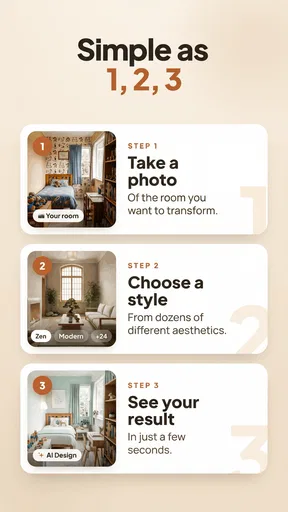
AI Redesign - Home Design is an interior-design app that uses artificial intelligence to create visual concepts for rooms and living spaces. Users can typically upload or select a photo, choose a preferred design style, and receive a redesigned version showing possible furniture, colors, layouts, and decorative elements. It is intended for inspiration and planning rather than professional architectural documentation.
How does AI Redesign - Home Design create room makeovers?
The app generally works by analyzing an uploaded image of a room and applying a selected theme, such as modern, minimalist, Scandinavian, traditional, or industrial. After processing the image, the AI generates a new visual interpretation of the space. Results can vary depending on lighting, camera angle, image quality, and how clearly the room’s walls, floor, and furniture are visible.
Is AI Redesign - Home Design free to download and use?
The application may be available as a free download, but some features can be restricted by advertisements, credits, daily limits, or a premium subscription. Before creating multiple designs, check the current pricing, trial conditions, renewal terms, and in-app purchase information shown on the Google Play Store or Apple App Store. Availability and costs may differ between Android and iOS.
Can the AI-generated designs be used for real renovations?
The generated images are useful for collecting ideas, comparing styles, and discussing possible changes with a decorator or contractor. However, they should not be treated as exact renovation plans. AI may place furniture at unrealistic sizes, ignore structural limitations, or suggest materials and layouts that are impractical. Always verify measurements, electrical requirements, building regulations, and product availability before starting work.
What should I know about privacy when uploading room photos?
Before uploading photographs, review the app’s privacy policy and permissions carefully. Room images may be processed on remote servers, and the service may collect technical information, usage data, or account details depending on its settings. Avoid including people, private documents, addresses, or other sensitive information in photos. Delete uploaded projects or your account if the app provides those controls.
